Showing posts with label Web Designing. Show all posts

Form validation methods

From my experience, I already use 3 main type of method to validate a form. Purpose of form validation is to prevent spamming, injection and empty message. In addition, this will make our form more friendly, safe and interactive.


Method is use :

1. JavaScript validation.
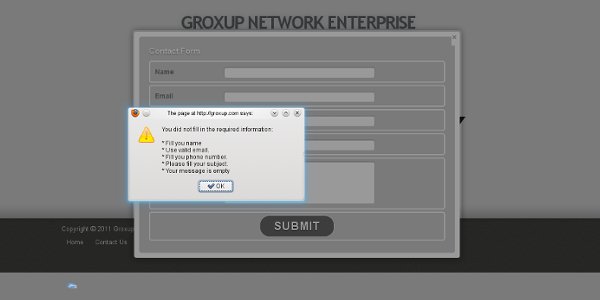
Integrated on the form web pages, refuse the submit form if the required fields is empty or out of criteria. This will pop-up a message window. We can this, on web page validation.

2. PHP script validation.
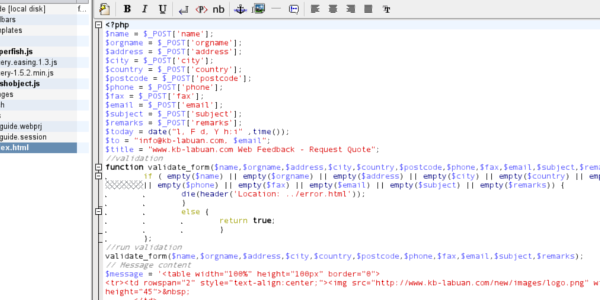
Add-on some validation script on the PHP file which processing the form output and send the mail. Then, redirect user to the corresponding page. We can say, this is on server validation.

3. Using captcha.
This method required user to fill some validation code to continue sending the form. Now a days, there was a lot of type of captcha. You can built and customised you own captcha or use free recaptcha. E.g: Recaptcha - Stop spam. Read books. We can say, this is a complete solutions for form validation; on web page and on server validation.


Next, I'll write a simple tutorial about applying this three methods of validating  a form.
Have a nice day!

Write by Arafa Daming

Enabling HTML5 on Internet Explorer (IE) with javascript

Create new HTML5 elements for Internet Explorer (IE) using javascript. Save this script as a javascript(e.g: html5.js) and include in your web pages.

This script should load before any others. We want the new elements to be parsed before pretty much anything happens.

document.createElement("article");
document.createElement("aside");
document.createElement("audio");
document.createElement("canvas");
document.createElement("command");
document.createElement("datalist");
document.createElement("details");
document.createElement("embed");
document.createElement("figcaption");
document.createElement("figure");
document.createElement("footer");
document.createElement("header");
document.createElement("hgroup");
document.createElement("keygen");
document.createElement("mark");
document.createElement("meter");
document.createElement("nav");
document.createElement("output");
document.createElement("progress");
document.createElement("rp");
document.createElement("rt");
document.createElement("ruby");
document.createElement("section");
document.createElement("source");
document.createElement("summary");
document.createElement("time");
document.createElement("video");


Example :

<!--[if lt IE 9]>
<script type="text/javascript" src="js/html5.js"></script>
<link rel="stylesheet" href="css/ie.css" type="text/css" media="screen" />
<![endif]-->

This is very usefull if you want to develop a HTML5 web pages.
Have a nice day!

Write by Arafa Daming

Make a simple rounded button with CSS

Minimizing the image usage on our web page is to reduce our page size and become easily to load. Usually, we are using an image as a fancy button. Now, with CSS3 new features, we can reduce images on our pages.

Example:

I'm a button

HTML code:

<a href="#" class="mybutton" title"I am a button">I'm a button</a>
CSS code:
 .mybutton  {
    border-right:1px solid #25839a;
    border-bottom:1px solid #25839a;
    padding:0px 16px;
    color:#fff;
    font-size:18px;
    line-height:38px;
    font-family:"Trebuchet MS", Arial, Helvetica, sans-serif;
    background:#ff6117;
    border-radius:10px;
    -moz-border-radius:10px;
    -webkit-border-radius:10px;
    text-decoration:none;


Hover code (Optional) :
 .mybutton:hover  {
    background:#6d777e;
    border-right:1px solid #6d777e;
    border-bottom:1px solid #6d777e;
    }


Write by Arafa Daming

Make a pop-up box like Facebook box

Someone ask me how to create a pop-up box as a notice to visitor. Then, I suggested jQuery to him i found this jQuery plugin (Facebox)

Now, I'll write tutorial about how to apply this plugin.

First, you need to enclose jQuery and this plugin to your page :
<script src="jquery.1.4.4.min.js"></script>
<script src="facebox.js"></script>
And then the jQuery script
<script language="javascript">
$(document).ready(function() {
 $.facebox.settings.opacity = 0.5;
 $('a[rel*=facebox]').facebox();
 $.facebox('This message will pop-up when the page loaded');
});
</script>

Put all this code in the HTML <head> tag.
Done. Have a try!
Visit the official site for more info.

Write by Arafa Daming

Defination of Web 1.0, Web 2.0 and Web 3.0

Web 1.0
  1. The first generation of the World Wide Web, characterized by separate static websites rather than continually-updated weblogs and social networking tools.
  2.  One-way broadcasting, meaning only the owner of the site can publish information.
  3.  Web 1.0 (1991-2003) is a retronym which refers to the state of the World Wide Web, and any website design style used before the advent of the Web 2.0 phenomenon.
  4.  Refers to the first stage of the World Wide Web linking web pages with hyperlinks.
Example : Static Page


Web 2.0
  1. The term Web 2.0 is associated with web applications that facilitate participatory information sharing, interoperability, user-centered design, and collaboration on the World Wide Web.
  2. The second generation of the World Wide Web, especially the movement away from static web pages to dynamic and shareable content and social networking
  3. Web 2.0 does not refer to any specific change in the technology of the Internet, but rather the behavior of how people use the Internet.
  4. Web 2.0 (or Web 2) is the popular term for advanced Internet technology and applications including blogs, wikis, RSS and social bookmarking.
  5. user interaction / behaviour
Example :You-Tube and it user, Facebook

Web 3.0
  1. The predicted third generation of the World Wide Web, usually conjectured to include semantic tagging of content.
  2. The creation of high-quality content and services produced by gifted individuals using Web 2.0 technology as an enabling platform.
  3. Access internet any time, any where, any device.
Example : Surfing Web 3.0 at your smart phone.


Please note that :
  • Don't "use", "build" or "design" web 3.0. They do not represent any look and feel. 
  • Web 2.0 & 3.0 are terms that cater for those who don't have clear understanding about the internet. 
  • If someone says "I want a web 3.0 website", "I want to make my site design looks like web 2.0" will only make people laugh, especially those who are internet savvy.

Have a nice day!

Write by Arafa Daming

CSS 3D Text

Example :

3D text

Code:

text-shadow: 0 1px 0 #ccc,
0 2px 0 #c9c9c9,
0 3px 0 #bbb,
0 4px 0 #b9b9b9,
0 5px 0 #aaa,
0 6px 1px rgba(0,0,0,.1),
0 0 5px rgba(0,0,0,.1),
0 1px 3px rgba(0,0,0,.3),
0 3px 5px rgba(0,0,0,.2),
0 5px 10px rgba(0,0,0,.25),
0 10px 10px rgba(0,0,0,.2),
0 20px 20px rgba(0,0,0,.15);


This is another new feature by CSS 3 (text-shadow).
Work on latest versions of Chrome, Safari, Firefox, and Opera which render multiple text-shadows on text elements.

Have a try. I already do it to my blog header. :D

Write by Arafa Daming

HTML & PHP - Make a funtioning contact form

Today, i'll make tutorial how to make a funtioning contact form. You can view sample by viewing my blog contact page.

First : The HTML 5 code.

<form action="the-php-file-url-here" enctype="multipart/form-data" id="myForm" method="post">
<fieldset>
<legend>Personal information</legend>
<label for="name">Name</label>
<input id="name" maxlength="50" name="name" size="50" type="text" value="" />
<label for="email">E-mail</label>
<input id="email" maxlength="50" name="email" size="50" type="text" value="" />
<label for="website">Website</label>
<input id="website" maxlength="50" name="website" size="50" type="text" value="" /></fieldset>

<fieldset>
<legend>Message</legend>
<label for="subject">Subject</label>
<input id="subject" maxlength="50" name="subject" size="50" type="text" value="" />
<label for="message">Yout Message</label>
<textarea cols="50" id="message" name="message" rows="5"></textarea></fieldset>

<fieldset>
<input class="button" name="send" type="submit" value="Send Message" /><input class="button" name="reset" type="reset" value="Clear From" /></fieldset>
</form>


Change the 'the-php-file-url-here' to your php file url. Embed this code to your contact page.

Second : The PHP file.


Write by Arafa Daming

[CSS3]Change text selection color

This is fantastic CSS3 effect, you can customize your selection color.
You can try select a text on this blog to see it in action.


Default Setting(for all text element):

::selection {
background:#f094b7;
color:#555;
}

::-moz-selection {
background:#f094b7;
color:#555;
}

::-webkit-selection {
background:#f094b7;
color:#555;
}


Selective Setting(for selective text element):

p.orange::selection {
background:#c2660d;
color:#fff;
}

p.orange::-moz-selection {
background:#c2660d;
color:#fff;
}

p.orange::-webkit-selection {
background:#c2660d;
color:#fff;
}


Currently FireFox, Safari, Chrome and Opera support the text section attribute, and the browsers that don’t support it simply ignore the code so nothing will break, so it doesn’t really matter.

Write by Arafa Daming

New HTML Tags list

Below is the list of HTML tags include HTML 5 new tags :


Write by Arafa Daming

How to use Xampp?

Today, we will install Xampp for windows on our own computer as a local web host.

What is Xampp?
XAMPP ( or ) is a free and open source cross-platform web server package, consisting mainly of the Apache HTTP Server, MySQL database, and interpreters for scripts written in the PHP and Perl programming languages. - en.wikipedia.org/wiki/XAMPP


Where to get Xampp?
You can download it from here : www.apachefriends.org
That site also provide information about how to install and manage.

How to use?
Usually, i use Xampp for testing my web pages. To test the web pages, put the file or folder at the "htdocs" folder in installed Xampp folder. For example : I create one folder of web pages named "mywebsite.com" in that "htdocs" folder.


To test the web pages, i start my Xampp and open my favorite web browser .
I just need to type this url on the web browser : "localhost/mywebsite.com" and enter.

Now, i can see preview my website on my computer. Finish!

For more infomation, read www.apachefriends.org

Write by Arafa Daming

New Web Design Trends

Arafa Daming - Web Design Trend


The main objective of websites is to introducing/promote your business and attract traffic; gain visitors. This visitors can be converted into real customer. So, implementation of new and attractive designs bring a great help in this direction. Here are some of my opinions about web designing nowadays :

Latest languages
The latest version of web designing languages is HTML5 and CSS3, also jQuery and MooTools continuing updating their version to improving the functionality and intercept any bug. Of course this latest languages offer more advanced features to make better design and function to the web. As HTML5, it bring better structure mark-up, using CSS3 to reduce images usage in web pages that is more light and easy load, jQuery and MooTools make the web page more interactive.

Simplicity
In this case, "less is more" principal applied. This is to prevent unwanted content. Compatibility and accessibility of the web page also reliable. This will lead to make visitor more relax in reading the information.

Serif Fonts:
The last decade saw most web designers choosing either Arial or Verdana for web text. This decade is likely to make a shift to Serif fonts. This is because, many browsers use high-resolution display screens and automatically increasing visitor readability.

Huge Images
We can see oversized logos or headers for a long time now. This is to create an immediate interaction with the visitors; "images content more word"

Navigation
Most important features in web page is the navigation. Good navigation will make the visitors become easier in crawling the web page and increase the interest level. Nowadays, we can see a lot of navigation style; hovering, drop-down, pop-up etc.

Typography
Using the idea of mix and match with fonts is very interesting interesting. Rotating and modifying different old and new fonts will make the web page stand-up and meaningful. A website with typography is better than a page with photos, which takes a long time to load.

Slide Show
This is as a brief presentation to visitor. Now we can see a sideshow that more functionality. This easily attract visitors eye and good slide show will lead to increase interest level. With this, it can save a lot of space and mentioning the web page easily.

Mobile Design
Since the introduction of the iPhone in 2007 and smartest smart phones that become more popular day by day. A lot of visitor come from the smart phone browser. So, mobile version become more important as a new way in viewing web page and promoting business.

Write by Arafa Daming